Scientific Data Exploration
Argos
Scientific data exploration powered by Elasticsearch
Search and explore large datasets of organisms, viruses, bacteria, and related biological information through an interactive React interface.
Role
Software Engineer
Company
Dzango Tech Accelerator
Ecosystem
Embleema
Focus
Search · Data · React
Context
Built within the Embleema ecosystem
Argos was a sub-project within the Embleema ecosystem. Embleema is a health-data and real-world-evidence platform that brings together complex healthcare and research data — including clinical, genomic, patient-reported, and other research datasets — for clinical and scientific use.
I worked on Argos during my time at Dzango. My contributions focused specifically on the Elasticsearch search infrastructure and the React frontend for biological data exploration. Embleema itself is a broader platform built by its own team.
Explore EmbleemaProblem
Making large scientific datasets explorable
Scientific datasets can become difficult to navigate when users need to combine multiple dimensions of information simultaneously. Researchers required a way to locate relevant organisms and biological records using multiple criteria — not just a single identifier or a raw list.
The data covered organisms, viruses, bacteria, biological taxonomy, and related scientific metadata. Users — including doctors and scientists — needed to search and filter across attributes such as location, family, date, and biological classification to identify records relevant to their work.
A simple database lookup was not sufficient for this type of exploration. The system needed an efficient search and indexing strategy, and a frontend capable of presenting complex search results clearly.
Search Infrastructure
Elasticsearch indexing & search
Search pipeline
Scientific Dataset
Organisms · Viruses · Bacteria · Biological Taxonomy
Data Processing & Indexing
Transformation and preparation for search
Elasticsearch Index
Structured, queryable document store
Search & Filter Queries
Multi-attribute retrieval across large collections
React Application
Research-oriented exploration interface
Researchers & Scientists
Doctors · Scientists · Clinical researchers
What I worked on
My work on the Elasticsearch side of Argos centred on making large scientific datasets searchable and usable. This involved indexing biological records, designing the structure of Elasticsearch indexes, and implementing the search and filter queries that powered the frontend experience.
Key principle
Data modelled for search is structured differently from data modelled for storage. A significant part of this work was understanding how to represent scientific records in a way that made them efficiently retrievable across multiple query dimensions.
Frontend
React research interface
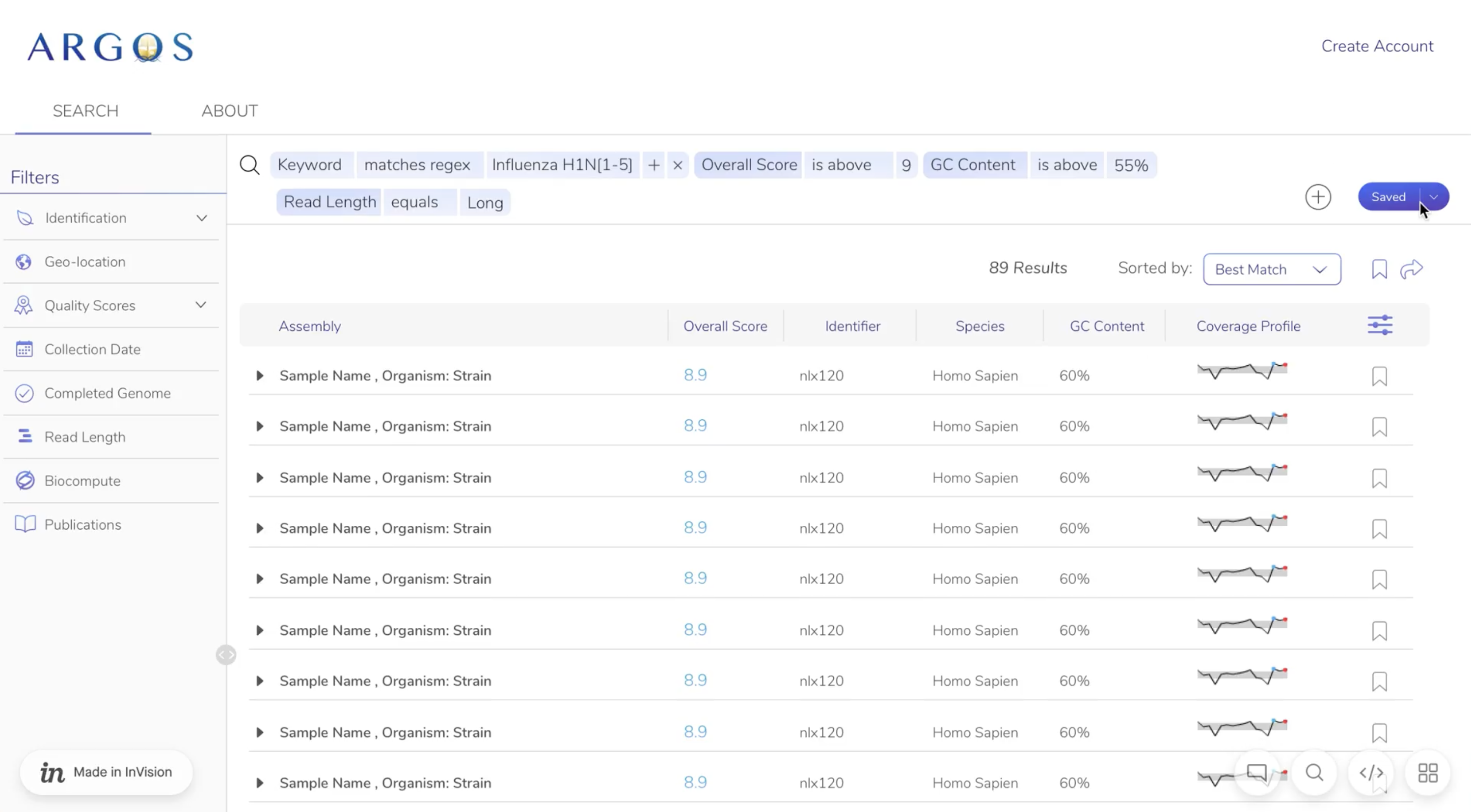
The React frontend I worked on gave researchers and scientists a dedicated interface for exploring the biological dataset. Rather than exposing raw data, the interface was designed around a search-and-filter workflow that matched how researchers actually approach dataset exploration.
The interface was search-oriented, filter-heavy, and data-dense — designed for users who need to combine multiple criteria to locate relevant records efficiently. Users could search organisms and narrow results using location, biological family, date, classification, and other available metadata.
Interface characteristics
· Search-oriented — query first, browse second
· Multi-filter — location, family, date, classification
· Data-dense — structured results for researcher workflows
· Designed for scientific users, not general audiences
Research workflow
Search
Query organisms by name, identifier, or attribute
Filter
Narrow results by location, family, date, or classification
Review results
Browse ranked, structured search output
Inspect record
View full biological metadata for a selected organism
Explore
Navigate related scientific information and taxonomy
Technical
Engineering challenges
Searching large datasets
Making large collections of scientific records searchable required designing an appropriate indexing strategy and query architecture. A simple database lookup was not sufficient for the type of multi-attribute exploration the project required.
Complex multi-dimensional filtering
Users needed to combine multiple independent dimensions simultaneously — location, biological family, date, and classification. This required careful query construction to produce correct and performant results.
Data-dense research interfaces
Scientific search interfaces can quickly become overwhelming when displaying dense, structured result sets. The React interface needed to balance information density with clarity, making complex data navigable rather than difficult.
Reflection
What I learned
- Designing search experiences around actual user workflows rather than data structure
- Elasticsearch indexing — how data is modelled for search differs from how it is modelled for storage
- Constructing queries that support multi-dimensional filtering efficiently
- Working with large, heterogeneous scientific datasets
- Building data-dense React interfaces that remain usable under information load
- Translating complex scientific records into interfaces that non-technical researchers can navigate